.svg)
Why prints get worse when the weather turns
Almost every common filament is hygroscopic: it pulls moisture out of the air around it. When that moisture reaches the hot end it turns to steam inside the melt, and the result shows up as stringing, bubbles, rough surfaces and weaker layers.
How quickly that happens is the part most people underestimate. Bambu Lab's own guidance puts typical indoor air at 45–65% relative humidity, and says that at around 55% RH, freshly dried filament can start absorbing moisture again within 2–12 hours. At 20% RH, the same spool stays dry for roughly 2–7 days.
Autumn and winter push indoor humidity the wrong way for months at a time. Windows stay shut, the heating cycles on and off, washing gets dried indoors, and damp outdoor air finds its way in. Meanwhile, spools that live on the AMS or a spool holder for weeks are exposed to all of it, around the clock.
A spool doesn't have to look or feel wet to print wet. If a material that printed well a month ago has started stringing or looking rough, and you haven't changed anything, moisture is the first thing to rule out.
Wet filament or bad settings? How to tell
Wet filament and bad settings produce overlapping symptoms, which is why people often spend an evening tuning retraction for a spool that just needed drying. These are the patterns that separate them:
| What you see | Points to moisture | Points to settings |
|---|---|---|
| Sound at the nozzle | Popping, crackling or hissing during extrusion | Silent extrusion |
| Stringing pattern | Dense clusters of short, fine strings, getting worse print by print | Long, sparse strings mainly on long travel moves |
| Surface | Rough, fuzzy or pitted walls, small holes or bubbles | Consistent ringing, blobs or zits at a seam |
| Strength | Brittle parts snapping along layer lines (especially PA and PC) | Weak layers on every spool of the same material |
| Which spools | One spool misbehaves, a fresh one of the same filament prints fine | Every spool of that material behaves the same way |
The fastest test is to print the same small, string-heavy model from a freshly opened or freshly dried spool. If the problem disappears, it was moisture. If it doesn't, work through the settings instead: our PETG stringing guide covers the diagnostic order, and Bowden vs direct drive explains why retraction values copied from other printers so often cause trouble. Bambu Lab's own advice is simple: if you're not sure whether a spool is dry, dry it.
Drying temperatures and times by material
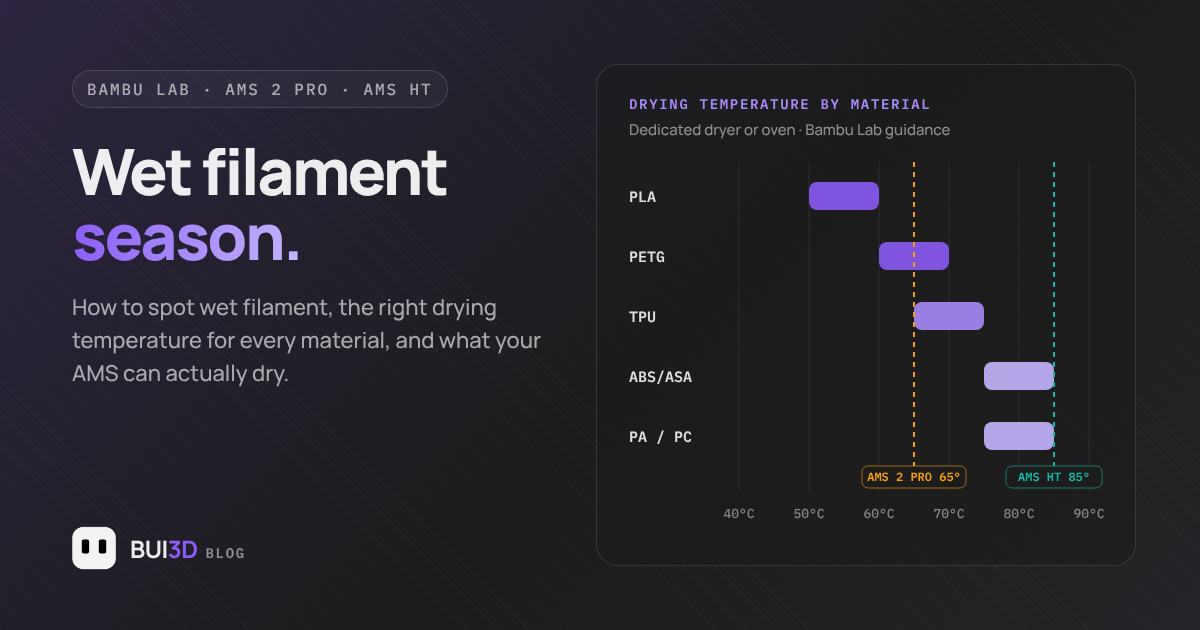
These are the drying settings published in the Bambu Lab Wiki. The first column is for a forced-air drying oven or dedicated filament dryer. The second is Bambu Lab's heatbed method on enclosed printers, covered in more detail below.
| Material | Dryer / oven | Heatbed method | Drying |
|---|---|---|---|
| PLA, PLA-CF / GF | 50–60°C · 8h | 65–75°C · 12h | Recommended |
| PETG, PETG-CF | 60–70°C · 8h | 75–85°C · 12h | Recommended |
| TPU | 65–75°C · 8h | 80–90°C · 12h | Required |
| ABS, ASA | 75–85°C · 8h | 90–100°C · 12h | Recommended |
| PC | 75–85°C · 8h | 90–100°C · 12h | Required |
| PA, PA-CF / GF, PAHT-CF, PET-CF | 75–85°C · 8–12h | 90–100°C · 12h | Required |
| PVA, BVOH | 75–85°C · 8–12h | 90–100°C · 12h | Required |
The heatbed figures are higher for a reason: the bed temperature isn't the temperature the filament actually sees. Heat has to travel up through the air under the cover, so the spool itself runs cooler than the plate beneath it.
PLA starts to soften at around 55–60°C. Drying it at PETG temperatures can deform the spool, fuse the outer wraps together and leave you with a spool that won't feed. Kitchen ovens and microwaves are a bad idea for any filament: Bambu Lab specifically recommends against both.
Drying in the AMS 2 Pro and AMS HT
The AMS 2 Pro and AMS HT both dry filament in place, rotating the spools as they go so they dry evenly, and both report temperature and humidity on the unit, in Bambu Studio and in Bambu Handy. The difference that matters is the temperature ceiling.
| AMS 2 Pro | AMS HT | |
|---|---|---|
| Maximum drying temperature | 65°C | 85°C |
| Fully dries | PLA, PETG and other lower-temperature materials | Everything in the table above, including engineering materials |
| Needs a higher temperature | ABS, ASA, PC, PA, PVA | None of the common materials |
| Spool rotation while drying | Yes | Yes |
Bambu Lab is direct about this: ABS, ASA, PC, PA and PVA need higher temperatures than the AMS 2 Pro can reach, so it recommends the AMS HT for fully drying them. The AMS 2 Pro will still take the edge off a slightly damp spool of those materials, but it won't do the job a proper drying cycle does.
The rules that catch people out
- No standalone drying. The unit has to be connected to the printer by its 6-pin bus cable to power on and enter drying mode, using the official power adapter.
- Not while it's feeding the print. An AMS that the current job is using, including one set up for auto-refill, can't dry at the same time. A unit the job isn't using can, though drying power may be reduced so the print gets priority.
- RFID only covers Bambu spools. Bambu Lab filament is matched to its drying settings automatically. Third-party spools need the temperature and time entering manually: use the dryer column above, capped at the unit's maximum.
- Lower PLA defaults are deliberate. If the PLA preset in your AMS looks cooler and longer than the oven figure, that's intentional: PLA sitting in the feed path softens at higher temperatures, so a gentler cycle is safer with filament loaded.
- Compatibility depends on printer and firmware. Some combinations, such as X1 and P1 series printers, need extra adapters or firmware updates before drying is supported, so check Bambu Lab's compatibility notes for your setup and keep firmware current.
Drying on the heatbed, no dryer needed
If you don't have a dryer or a drying-capable AMS, Bambu Lab documents a heatbed method for its enclosed printers:
- Place the spool flat on the build plate and cover it with a filament box or a clear PC box to hold the heat in.
- Set the bed to the heatbed temperature from the table above and close the door.
- Run for around 12 hours, turning the spool over every 6 hours so both sides dry.
- Move the spool straight into sealed storage, or onto the printer, once it's done.
It's slower and less even than a dedicated dryer, but it works, and it's often the difference between a failed nylon print and a good one when nothing else is to hand.
Keeping filament dry once it's dry
Drying is only half the job. Bambu Lab's guidance is to store most filaments below 20% RH for long-term dryness, which normal room air won't give you at any time of year.
- Seal it. An airtight box or vacuum bag with fresh desiccant is enough for most spools.
- Measure it. A cheap hygrometer in each storage box tells you when the desiccant has given up, rather than finding out from a failed print.
- Refresh the desiccant. Desiccant that has turned lumpy or pasty has stopped working and needs replacing or regenerating, including the packs inside the AMS.
- Don't park spools for weeks. A spool sitting on the AMS between jobs is exposed the whole time. Either return it to storage, or run a drying cycle before the next long print.
- Write down when it was dried. "Was this dried last week or last month?" is the question nobody can answer from memory.
A five-minute autumn checklist
- Check the humidity reading on your AMS, or on a hygrometer next to the printer.
- Replace or regenerate any desiccant that has gone lumpy.
- Dry the spools you'll use this week, starting with the ones listed as required: TPU, PC, PA and PVA.
- Note the date each spool was dried.
- If a print still strings after a proper drying cycle, it's a settings problem: start with retraction.
Frequently asked questions
Can I dry PLA at 65°C in the AMS 2 Pro?
No. PLA starts to soften at around 55–60°C, so spools and filament sitting in the feed path can deform at 65°C. Use Bambu Lab's PLA preset in the AMS, or 50–60°C in a dedicated dryer.
Can the AMS 2 Pro dry filament while the printer is printing?
Only on an AMS unit that the current print is not using. A unit that is feeding the job, including one set up for auto-refill, can't dry at the same time.
Can the AMS 2 Pro fully dry nylon, PC, ABS or ASA?
Not fully. Bambu Lab lists ABS, ASA, PC, PA and PVA as needing higher temperatures than the AMS 2 Pro's 65°C maximum, and recommends the AMS HT, which reaches 85°C, for those materials.
How long does dried filament stay dry?
According to Bambu Lab, roughly 2–7 days at 20% relative humidity. At around 55% relative humidity it can start absorbing moisture again within 2–12 hours.
Do I need to dry brand-new filament?
A freshly opened, vacuum-sealed spool of PLA or PETG is usually ready to print. Bambu Lab lists drying as required for TPU, PC, PVA, BVOH and the PA family, so dry those before the first print regardless.
Know when a spool needs drying, before the print fails
FilamentLab tracks every spool in your collection with live humidity monitoring and AI failure diagnosis, built exclusively for Bambu Lab printers, with over 1,000 verified presets.
Explore FilamentLabSources: Bambu Lab Wiki: Filament drying recommendations · Bambu Lab: AMS 2 Pro